

Manage your banking needs wherever and whenever you like with the KBC Brussels Business app
- Log in and sign transactions in the KBC Brussels Business Dashboard
- Sign contracts and (counter-)sign payments whenever you need, even if you’re away from the office
- View your accounts anytime and anywhere
What is the KBC Brussels Business app?
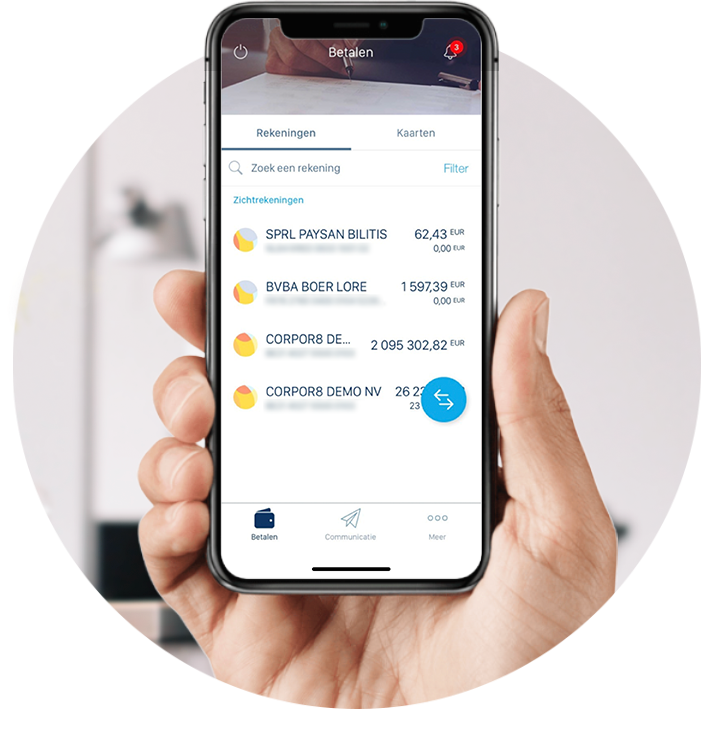
It’s a free app that lets you quickly manage your banking on the go. Whether you’re on the move, dealing with something quickly outside office hours, setting up some last-minute payments or visiting a customer, banking tasks follow you no matter what. Are you often in the position where you have to approve payments while you’re away from the office?
Or perhaps you just want to keep an eye on your cash flow, regardless of where you are? The app is free for customers using the KBC Brussels Business Dashboard and is designed to keep mobile banking simple, fast and secure.
Why should business owners use the KBC Brussels Business app?
The ideal solution for some typical challenges:
‘I need to approve some payments, but I’m not in the office’
Sound familiar? Invoices regularly lie around because you or a colleague aren’t at your computer.
With the KBC Brussels Business app, you can act quickly and approve payments and contracts wherever you are,
ensuring that delays in your processes are relegated to the past!
‘I want to be able to quickly check how my business is doing, no matter where I am’
Cash flow is crucial in a company, but you don’t always have access to your KBC Brussels Business Dashboard.
Check your balance and transactions in real time to help you make better-informed decisions more quickly.
‘My admin work takes up too much time and is unclear’
With just one app, you can manage your approvals, payments, account overview or cards.
Everything is arranged conveniently for you in one place.
What exactly can you do with the app?
- Easily carry out payments and approve them
- Check your accounts at all times
- Track your spending
- Receive notifications about urgent actions and due dates
- Manage and view your debit and business credit cards and enable them for use in the US or online in just a few clicks
- Get alerted to urgent tasks (for example, you receive a push notification on your phone 48 hours before a due date)
The KBC Brussels Business app at a glance
- Time-saving: bank when you need to (without having to wait until you’re in the office)
- Flexibility: work wherever and whenever you want
- Orderly: get a clear idea of your financial situation at all times
- Easy to use: benefit from an all-in-one app that is intuitive and straightforward
- Security: bank with maximum protection
Interested? Let’s get started!
1. Request access through your KBC Brussels Business Dashboard administrator
The KBC Brussels Business Dashboard administrator can request KBC Brussels Business on your behalf in the KBC Brussels Business Dashboard.
All they have to do is go to ‘Settings’, add you as a KBC Brussels Business user and request your activation codes. If you are the manager of your company or run a sole trader business, you are the administrator.
And that’s it – you now have the ability to bank in your pocket.
FAQs about the KBC Brussels Business app
Transfer money with ease
Thanks to KBC Brussels Business, you can easily take care of SEPA payments to your own accounts and those of third parties. The table below gives you an overview of the standard limits in place. Your profile view also lets you check your limits per day and per transaction. These can be changed at your KBC Brussels branch.
| Standard transaction limit | Standard daily limit | |
| Transfers between your own accounts | Unlimited | Unlimited |
| Transfers to unknown beneficiaries | 2 500 euros | 2 500 euros |
| Transfers to known beneficiaries | 10 000 euros | 10 000 euros |
| Signing individual payments | 100 000 euros | 100 000 euros |
| Signing batched payments | 100 000 euros | 100 000 euros |
In the KBC Brussels Business Dashboard, there are different limits depending on the powers of attorney you have been granted. Learn more about limits.
Direct contact
KBC Brussels Business allows you speak with the right KBC Brussels staff member directly and see their full name, so you always know who you’re talking to. You can ask your question in the Communication Centre and get an answer in the app, which means you always have support and advice available.
FAQs about business mobile banking
How can I approve business payments on my smartphone?
The KBC Brussels Business app lets you view, check and approve business payments using your phone. You don’t need to be in the office and you don’t need a card reader for that. It means you can quickly deal with payments, wherever you’re working.
What is the best banking app for the self-employed?
The best app depends on your needs. If you’re looking for one that allows you to approve payments quickly, gives you a real-time view of your business finances and enables secure mobile banking, the KBC Brussels Business app offers a comprehensive solution – ideal for the self-employed and business owners.
How can I save time on my financial paperwork?
You can do so by centralising your main banking business in one place. The KBC Brussels Business app enables you to authorise payments, check your accounts and receive notifications without having to log in to different systems every time. Such centralisation means you can handle administrative tasks more quickly and efficiently.